
Navigate Excel like a professional.
No AI. No data collection. Hard tools for hard Excel work.
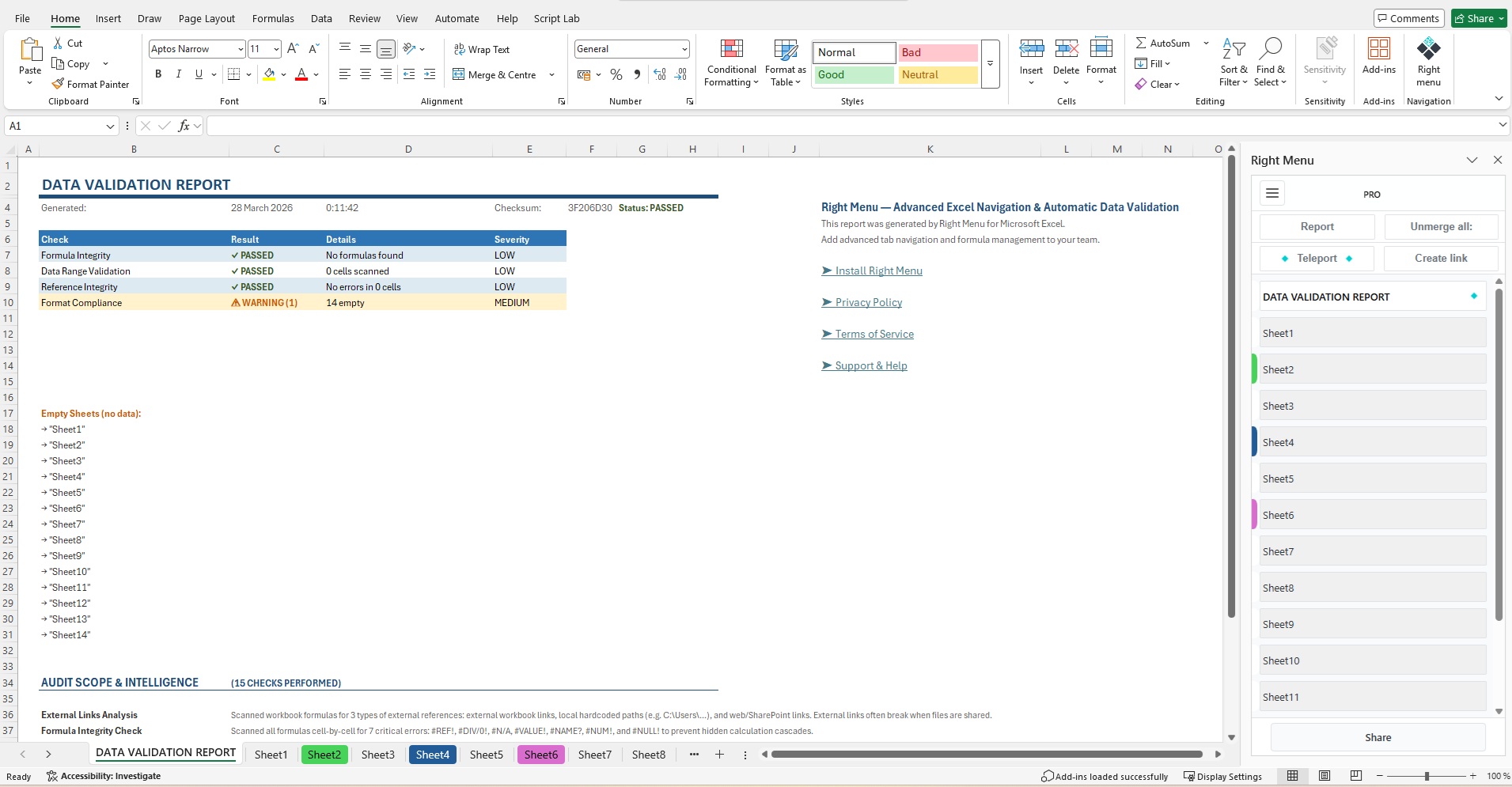
Right Menu is a Microsoft Excel Add-in with vertical sidebar navigation for workbooks with 20 to 150+ sheets. Full sheet names, color indicators, one-click audit, cross-sheet formulas — everything runs locally inside your Excel.
Video Tutorials
Professional Tools
How Right Menu Changes the Game
Built for analysts, cost managers, and professionals who work with 50+ sheets daily.
- Vertical Sheet Navigation
-
Full sheet names, never abbreviated. Whether you have 20 or 150 sheets, the sidebar maintains its shape — you just scroll. Color indicators preserve readability instead of painting entire tabs.
- Report — One-Click Workbook Audit
-
Scans the entire workbook across 6 categories: external links, hidden sheets, formula errors, numbers as text, merged cells, empty sheets. Generates a report with clickable links to every problem cell.
- Teleport — Instant Navigation
-
Right Menu remembers the previous sheet. Teleport jumps you back and forth in a fraction of a second. Indispensable for workbooks with 10+ sheets.
- Link to — Visual Cross-Sheet Formulas
-
Click the source sheet and cells — Right Menu builds the formula automatically. No keyboard needed. Combined with Teleport, create cross-references in seconds instead of minutes. Let your hands rest from stretching across hotkeys — trust us, it's far more comfortable.
- Copy from — Values from Any Sheet
-
Copy from bypasses protection limitations. Values are inserted as static data — no formulas, no broken links. No keyboard shortcuts, just clicks. Works where native Excel copy-paste refuses to operate.
- Unmerge — Fix Merged Cells
-
Merged cells silently destroy sorting, filtering, and pivot tables. Unmerge fixes every merged cell in the entire workbook — or just the current sheet — preserving all data and formatting.
How to Get Started
- 1 Install the add-in
-
Any user with Microsoft 365 can install Right Menu Enterprise from AppSource. The add-in is free to install — it appears in the Excel ribbon immediately.
- 2 Purchase a subscription to activate
-
The add-in needs an active subscription to work. Your IT administrator (or anyone with Azure subscription permissions) purchases a plan on Azure Marketplace. After activation, license keys are issued and the add-in is ready to use.
- No AI. No Data Collection.
-
We are a two-person company. We deliberately chose not to add AI to Right Menu. We don't transfer your data, we don't analyze it, we don't store it anywhere. Everything runs locally inside your Excel — nothing leaves your workbook.
Let's be honest: we are two people with 30 years of our own construction data piled up to the ceiling. We physically do not have the capacity — or the desire — to look at yours. Your spreadsheets stay yours. Period.
- Who We Are
-
We are just two people. Elena is a solo cost manager who lived through the pain of construction data, and Oleg is a solo IT developer who wanted to make her life easier. Right Menu was built out of genuine necessity, in our living room, to solve a very real problem faced every single day.
- Our Philosophy
-
Right Menu is not a robot or automation. It is a human accelerator. It doesn't do the work for you; it removes the unbearable friction of daily routines. Standard Excel with a hundred sheets is like heavy military boots. Right Menu is like custom-made Italian leather shoes. You can reach your destination in both — but with the first, you'll have blisters by evening.